Download the blank tracking sheet
Download the blank Trial Reels tracking template (CSV). It contains the nine column headings below and empty rows, with no sample performance data. Import it into your preferred spreadsheet app, keep an untouched copy, and make a working copy for your own account.
This is an original editorial template. Buffer's author describes forgetting a location tag during a comparison, illustrating why small publishing details deserve a record [S05: Buffer's first-person account]. Kapwing reports views, saves, and followers separately in its own small comparison [S06: Kapwing's brand-reported study]. Those accounts informed our field choices; their results are not entries in this download.
The sheet supports a publishing log, including posts you are not comparing. For interpreting version comparisons, use our Trial Reels A/B comparison guide. For frequency questions, use the daily posting guide. This page explains what to put in each cell and how to preserve its meaning.
What each tracking field means
The table is a field illustration, not a screenshot of Instagram or a set of measured results. The download uses these exact headings. Our labels are organizational choices, not promised interface labels.
| Content ID | Trial or shared | Posted (date) | Views at 24h | Views at 72h | Non-follower share | Follows | Saves | What I changed next |
|---|---|---|---|---|---|---|---|---|
| Your stable post reference | Status and any sharing transition | Publication timestamp and time zone | Cumulative views at the first planned checkpoint | Cumulative views at the later checkpoint | Available audience percentage, with denominator | Post-attributed count if available | Visible count at the stated checkpoint | Next action and reason |
Content ID: assign a reference that stays with one upload. Keep the post link beside it in the same cell if useful. Give a separate upload its own ID even when it uses the same footage. Use your own naming convention consistently so later notes can find the right record.
Trial or shared: record the status you observed. If a trial is later shared more widely, append the transition time and whether you initiated it or observed an automatic action. Preserve the original status rather than silently replacing it. This lets a later reader see which stage a snapshot belongs to.
Posted (date): include the actual publication time and time zone, not just the day you prepared the file. Retain the original posting timestamp after a sharing transition; add the sharing time to the status field. A consistent timestamp makes the checkpoint labels usable.
Views at 24h and Views at 72h: these are our chosen logging checkpoints, not performance targets or a claim that every account exposes the same report. Copy the cumulative count visible at each check. If you check late, include the actual post age in the cell. Keep the two snapshots separate; do not add them into a total.
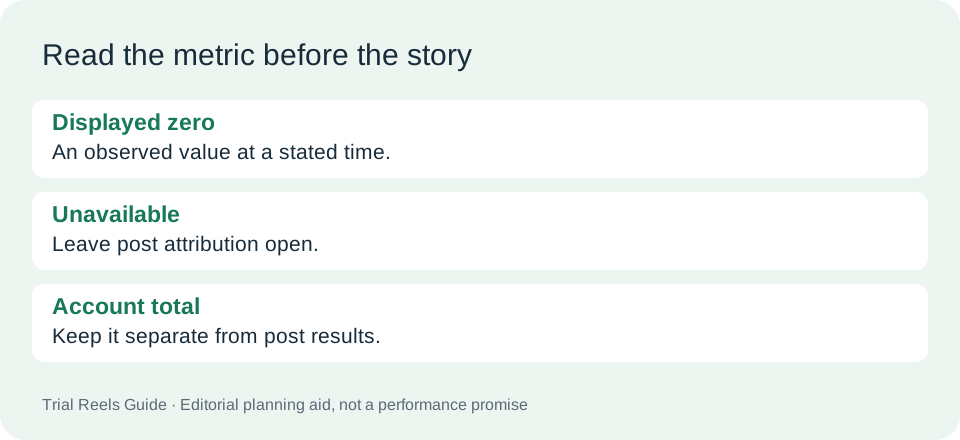
Non-follower share: here, “share” means the portion of the measured audience, not how often people sent the Reel. Copy an available percentage with its original label and denominator, such as views or accounts reached. If that breakdown is unavailable, write “unavailable.” Use what your own account actually displays; do not assume every trial has a complete non-follower audience.
Follows and Saves: enter the visible post-level counts at your stated review point, with the metric labels and capture time. Our default is the later checkpoint. If follows are visible only as account growth, mark post attribution unavailable and keep that account total in separate notes. Do not put a total-account change into a post-attributed column.
What I changed next: write the action you intend to take and the observation behind it. If nothing has changed, say “no change planned” or “awaiting review.” Keep a planned action distinct from an edit already made.
Keep a short context note beside each record
Keep the CSV small by storing supporting context in a separate note keyed to Content ID. Our recommended note contains the question, content topic, version description, account context, and any other activity that could complicate interpretation. Add the caption, audio, location tag, and relevant publishing settings when they matter to your question.
Save a screenshot or export reference with the observation timestamp and original metric wording. A private folder can hold those references; the public template needs no audience identities. Record what you can verify without collecting individual followers' personal details.
Buffer's location-tag admission is a practical reason to preserve accidental differences [S05]. Kapwing's report separates content types and states when it reviewed performance [S06]. Our recommendation is to retain that kind of context alongside your own counters, rather than treating either source as a benchmark your account should match.
For an illustrative entry, a creator might note that a tutorial gained a new caption between uploads and that one review happened late. This is a hypothetical workflow example, not a test we performed. The note makes those limitations visible without inventing a corrected view count.
Use missing values and review notes consistently
Before the first entry, choose a simple convention: blank means not entered yet, “unavailable” means the account did not expose the metric, and zero means the displayed value was actually zero. Use “not applicable” only when the field does not fit the record. This is our logging convention, not an Instagram requirement.
If you miss a checkpoint, write “missed” and capture the next observation with its actual timestamp. Do not reconstruct a past count from memory. If a value looks rounded, preserve its displayed form in your notes instead of manufacturing extra precision.
At review, check the Content ID, posting time, metric source, and sharing status before reading across the counters. Describe what was observed, then write a next action that fits your original question. For example, an unclear explanation may call for a clearer opening; an unavailable follows metric may call for better recordkeeping before any growth claim.
Our recommendation is to keep observations and decisions in separate sentences within the final cell. “Review missed; schedule the next capture” is a useful decision even without a performance conclusion. A filled row should help you resume the work later, not pressure you to declare a success.
When you return to the file for another review, keep the earlier observations intact. Add a dated note rather than rewriting a past decision as though you knew the later outcome. If you correct a transcription error, identify the correction and retain the source reference. This makes the log understandable to a teammate who did not watch you collect the numbers.
Before handing the sheet to someone else, include a short explanation of your blank and unavailable conventions, the chosen review point for follows and saves, and the location of the supporting notes. Share a copy with account details removed when you only need feedback on the format. A useful handoff explains how the cells were filled without implying that the template validates the underlying distribution or attribution.
FAQ
Is this an official Instagram template?
No. We created the fields and blank CSV for this guide. S05 and S06 are attributed examples that informed the design, not official specifications or experiments conducted by this site.
What if my account does not show one of these metrics?
Use what your own account actually displays. Mark the field unavailable, preserve the labels you can see, and leave any unsupported inference open. The presence of a column does not establish feature access or metric availability.
Can I add regular Reels to the same file?
Yes, as an organizational choice. Label them clearly as regular posts in the status field and preserve the same timestamp conventions. Keeping records together does not establish that their audiences or publishing conditions were equivalent.
Does the CSV calculate a winning post?
No. It has headings and empty rows, without formulas, scores, or borrowed results. Choose your own review question, keep the relevant observations, and consult the linked comparison guide when interpreting differences between versions.
Download a fresh copy and complete one clearly documented record for your next Reel.